
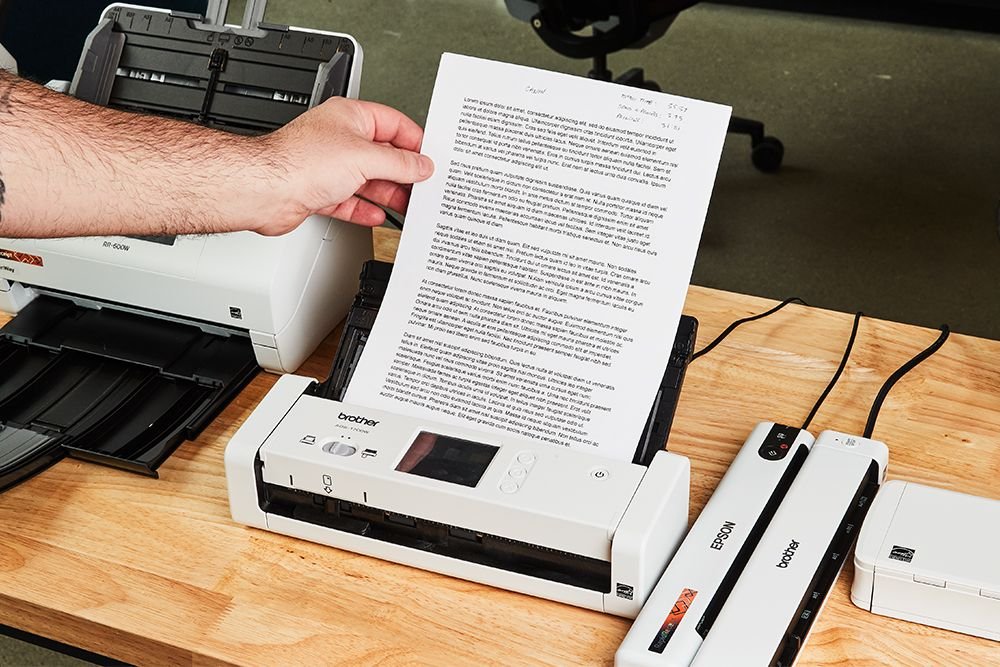
In the rapid digital evolution of 2026, the phrase “paperless office” has shifted from a futuristic ambition to a functional reality. At the heart of this transformation lies a tool that has reinvented itself for the AI era: the document scanner. No longer just a peripheral for making simple photocopies, the modern scanner is an intelligent gateway that converts physical chaos into organized, actionable data.
Whether you are a law firm managing thousands of case files, a healthcare provider digitizing patient records, or a remote professional clearing out years of tax receipts, choosing the right scanning solution is pivotal. In this guide, we’ll explore how document scanners have evolved and how to choose the best one for your 2026 workflow.
The Intelligence Revolution: Why Scanners Matter More Than Ever
For years, skeptics predicted that smartphone cameras would make dedicated scanners obsolete. However, in 2026, the gap between a “photo of a document” and a “professional scan” has never been wider. Dedicated document scanners now incorporate Neural Processing Units (NPUs) and AI-driven software that do much more than just “take a picture.”
1. AI-Powered OCR (Optical Character Recognition)
Modern scanners don’t just see shapes; they understand context. Advanced OCR now achieves 99% accuracy in over 120 languages. This means a scanned invoice isn’t just a PDF—it’s a searchable, editable file where your software can automatically extract the date, vendor, and total amount.
2. Intelligent Image Enhancement
The scanners of 2026 automatically handle the “dirty work.” They remove shadows, straighten skewed pages, and even filter out background noise or coffee stains. For businesses, this ensures that every digital record is as legible as—if not better than—the original paper.
3. Automated Compliance and Security
With global data privacy regulations like GDPR and HIPAA becoming more stringent, modern scanners include “Secure-at-Source” technology. They can automatically redact sensitive information (like Social Security numbers) during the scanning process and encrypt files before they ever reach the cloud.
Choosing the Right Document Scanner for Your Needs
The market in 2026 is segmented into four primary categories, each designed for a specific type of user.
| Scanner Type | Best For | Key Feature |
| Sheet-fed (Desktop) | High-volume offices, legal, finance | High-capacity ADF (Automatic Document Feeder) |
| Portable / Mobile | Business travelers, site inspectors | Battery-powered, ultra-lightweight |
| Flatbed | Fragile photos, thick books, delicate art | High-resolution glass platen |
| All-in-One (MFP) | Small home offices, light usage | Multitasking (Print/Scan/Copy/Fax) |
The Powerhouse: Sheet-fed Scanners
If you deal with stacks of paper, a sheet-fed scanner is non-negotiable. Models in 2026, such as the Brother ADS-4900W or the Fujitsu ScanSnap iX1600, can process up to 60 pages per minute. They utilize “Single-pass Duplex” technology, which scans both sides of a page simultaneously, effectively doubling your productivity.
The Specialist: Flatbed and Overhead
For those digitizing historical archives or fragile documents that can’t be fed through rollers, the flatbed remains king. Overhead scanners have also gained popularity for book digitizing, using AI to “flatten” the curve of the pages digitally.
Integrating Digital Strategy with Physical Tools
A document scanner is only one piece of the digital transformation puzzle. To truly maximize the value of your digitized files, your business needs a robust digital infrastructure.
This is where the expertise of companies like Tecisoft becomes essential. While a scanner handles the physical-to-digital transition, a technology partner ensures that those digital files live in a secure, efficient, and well-integrated ecosystem. From custom software development to IT consulting, they help organizations bridge the gap between their hardware investments and their long-term business goals, ensuring that “going paperless” leads to actual “going faster.”
3 Tips for a Faster 2026 Workflow
To get the most out of your hardware, consider these three best practices:
- Direct-to-Cloud Scanning: Don’t waste time scanning to a desktop folder and then dragging files to the cloud. Most 2026 models allow you to scan directly to Google Drive, SharePoint, or Dropbox with a single touch.
- Standardize Your Naming Conventions: Use your scanner’s software to set up “Profiles.” For example, a “Tax” profile could automatically name files with the current date and “Tax_Receipt” prefix.
- Regular Maintenance: Even the best scanners have rollers that wear out. A quick wipe with a specialized cleaning sheet every 1,000 scans will prevent paper jams and streaks.
Conclusion: Investing in Clarity
The document scanner of 2026 is no longer a “boring” office appliance; it is a high-speed engine for data entry and organizational clarity. By removing the friction of physical filing, you free up your team to focus on higher-value tasks.
As you look to upgrade your office or home setup, remember to look beyond the “dots per inch” (DPI). Look for a machine that integrates with your existing software, offers high-level security, and provides the AI features that turn a simple image into a powerful business asset. In a world that moves at the speed of light, don’t let a stack of paper hold you back.
