
Understanding what do internet cables look like is important for anyone setting up home Wi-Fi, office networks, or troubleshooting connectivity issues. These cables are the physical backbone of internet access, connecting your router to modems, computers, and other devices. While they may look simple, they play a powerful role in ensuring fast and stable internet communication.
In router connections, internet cables come in different shapes, colors, and categories depending on their speed and purpose. Most users encounter Ethernet cables, which are the most common type used to connect routers to devices or modems. Knowing how they look and function helps reduce confusion during setup and improves overall network management.
Basic Appearance of Internet Cables in Router Setups
When people ask what do internet cables look like, they are usually referring to Ethernet cables used in home routers. These cables typically have a slightly thick, flexible plastic coating and are often blue, yellow, grey, or black. At each end, they feature a clear plastic connector known as an RJ45 plug.
Inside the connector, you can usually see small colored wires arranged in a specific order. This transparent clip is one of the easiest ways to identify an internet cable compared to other types of cords. The shape is rectangular, and it clicks securely into the router’s LAN or WAN ports.
In most router setups, these cables connect the modem to the router’s WAN port or the router to a computer’s Ethernet port. Their appearance is consistent across brands, making them easy to recognize even for beginners. Despite small variations in color or thickness, the connector design remains standard.
Another common feature is their flexibility. Internet cables are designed to bend easily without breaking internal wiring. This makes them suitable for running along walls, desks, or behind furniture in home and office environments.
Different Types of Internet Cables Used with Routers
To fully understand what do internet cables look like, it is essential to know that not all cables are the same. The most common type is the Ethernet cable, but there are different categories such as Cat5e, Cat6, and Cat7. These categories mainly differ in speed and shielding but look quite similar externally.
Cat5e cables are usually thinner and widely used in basic home internet setups. Cat6 and Cat7 cables tend to be slightly thicker due to better shielding, which reduces interference and improves performance. However, all of them use the same RJ45 connector at both ends.
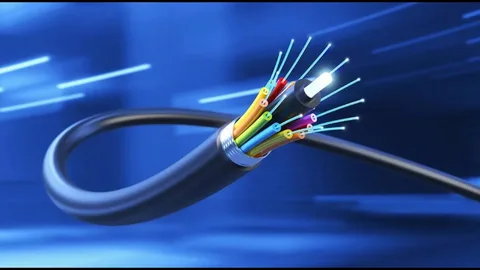
Another type of internet-related cable is the fiber optic cable, although it is less commonly plugged directly into home routers. These cables are often thinner, sometimes transparent, and made of glass or plastic fibers. They are typically used between the service provider and the modem.
In most router connections, however, users will only see Ethernet cables. These are the standard choice because they are affordable, reliable, and compatible with nearly all networking devices. Their appearance remains consistent even as technology improves.
How Internet Cables Connect to Routers
When identifying what do internet cables look like, it helps to understand how they connect to routers. A typical router has multiple ports on the back labeled LAN, WAN, or Internet. Ethernet cables are plugged into these ports to create a wired connection.
The connector of the cable has a small clip that locks it into place when inserted into the port. This ensures the connection remains stable and does not disconnect easily. The transparent head of the cable often shows small gold or copper pins inside, which transmit data signals.
One end of the cable usually connects to the modem provided by the internet service provider. The other end connects to the router or directly to a computer. This physical connection allows data to travel at high speed with minimal interference.
In office setups, multiple Ethernet cables may connect a single router to several devices. This creates a local area network (LAN), which is faster and more stable than wireless connections. The cables may look identical, but their purpose depends on where they are plugged in.
Physical Features That Help Identify Internet Cables
To better understand what do internet cables look like, it is helpful to focus on their physical features. One of the most noticeable characteristics is the RJ45 connector, which looks like a slightly wider phone plug but with eight metal pins inside.
The cable itself is usually round or slightly flat, depending on the design. Some modern cables are made flat to make them easier to run under carpets or along walls. The outer jacket is made of durable PVC material to protect the internal twisted copper wires.
Color coding is another feature that helps identification. While the color does not affect performance, manufacturers often use different colors to help users distinguish between multiple connections. For example, blue cables might be used for internet, while yellow cables may connect internal devices.
Length also varies significantly. Internet cables can be as short as one meter or extend beyond 20 meters for larger setups. Despite these differences, the connector remains the same, making them universally compatible with routers and networking devices.
Common Uses of Internet Cables in Networking
When exploring what do internet cables look like, it is equally important to understand their use cases. In home networks, they are commonly used to connect a router to a desktop computer or gaming console for stable internet access.
In offices, Ethernet cables connect multiple devices to a central router or switch, ensuring fast communication between computers, printers, and servers. This wired setup reduces lag and improves productivity compared to wireless networks.
Internet cables are also widely used in gaming setups where stable, low-latency connections are required. Unlike Wi-Fi, wired connections through Ethernet cables reduce interference and maintain consistent speeds.
Even in smart home systems, internet cables are used behind the scenes to connect hubs, security cameras, and networking equipment. Although users may not always see them, they remain essential for maintaining a strong and reliable network infrastructure.
Conclusion
In summary, understanding what do internet cables look like helps users easily identify and manage their network connections. These cables are typically Ethernet cables with RJ45 connectors, featuring a clear plastic head and color-coded internal wires. They are flexible, durable, and come in different categories such as Cat5e, Cat6, and Cat7, each offering different performance levels.
Whether used in homes, offices, or gaming setups, internet cables play a crucial role in delivering stable and high-speed connectivity. Even though they may look simple, their design is essential for ensuring reliable communication between devices.
